Showing posts with label Microsoft. Show all posts

Windows Phone 7 in-depth preview (by Engadget)

Overall look and feel
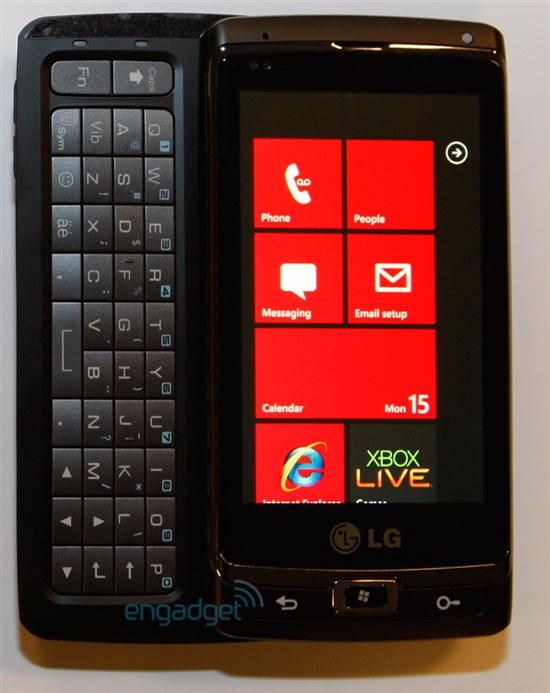
As before the "Metro" UI is in full effect here, meaning lots of very 2D, stark blocks of color and text. Actually, 2D isn't quite right -- the interface utilizes a lot of layers within a single page, so when you're swiping through menus you get a kind of parallax scrolling effect reminiscent of 16 bit side-scrollers (think Castlevania for the SNES). It actually works really well here, giving a sense of depth and detail but not detracting from the content Microsoft is putting up front.

This is probably the most accurate and nuanced touch response this side of iOS4. It's kind of stunning how much work Microsoft has done on the user experience since we first saw this interface -- everything now comes off as a tight, cohesive whole. It really put one of our major fears about Windows Phone 7 to rest.

The overall navigation of the UI to be really quite intuitive, despite the fact that a good number of options and in-app menus are accessible only through a long press... something you're not really made aware of in most cases. The long press becomes a bit like the skeleton key of the OS -- you just have to try it and see what kind of functionality it unlocks. Once you get into the habit of holding down on items instead of wildly searching for the next screen or tile, it makes a lot of sense, but it does take some getting used to.

Windows Phone 7 relies on a drop down, Android-like window shade to show when you've got a new SMS message, so Microsoft is already besting Apple there, and if you're playing music in the background, you're able to bring up your controls by tapping one of the volume buttons. Weirdly, that same area up top is used to show your signal, battery, and WiFi status, but it only drops down if you touch or swipe the upper part of the screen.

Keyboard
Let's just put this up front: the keyboard in Windows Phone 7 is really, really good. We're talking nearly as good as the iPhone keyboard, and definitely better than the stock Android option. It's one of the best and most accurate virtual keyboards we've used on any platform -- and that's saying a lot.

The WP7 keyboard is as simple and clean as the rest of the OS, showcasing little more than rows of monochromatic keys (white on black or black on white depending on your app), which pop-up a letter above them when depressed. Hold on a key and you get additional options for accents, just as you'd expect. The general layout offers a familiar placement of the shift, return, and number / punctuation keys, but adds an emoticon button as well.

Contact management and social networking
Windows Phone 7 doesn't have "contacts," per se -- it has a People app, and there's quite a difference. This is a thoroughly social platform, and it doesn't really seek to make any sort of differentiation between people you talk to / text / email, those you just casually observe, and those with whom you're "friends" in name only. If that kind of philosophy reeks of Motorola Blur or Palm Synergy, you're on the right track; as soon as you add a Windows Live, Exchange, or Facebook account, it pulls in every contact associated with that account and disperses associated content throughout your entire phone.

If you've got a lot of Facebook friends, this renders your People app all but useless as a traditional phone contact list. So, say you're looking for someone's phone number: if you're a normal human being with maybe a couple hundred or fewer actual contacts, you're used to just flicking through your contact list to get to whomever you need. With Windows Phone 7, though, Facebook has puked all over that list, so Microsoft instead recommends you search for what you're looking for (matching names filter as you type), pin extremely frequent contacts as tiles on your home screen, or make use of People's Recent list, which auto-populates with contacts that you've recently used.

Email and messaging
As with most smartphones these days, email setup in Windows Phone 7 is relatively automated and painless, and there are plenty of options to go with most people's leanings. When you initially boot the phone, you're asked to provide a Windows Live ID, though it's not necessary to use one. On the email setup screen, you're provided with self-configuring options for the aforementioned Live, Outlook, Yahoo! Mail, and Gmail. You also get options for manual setup of POP or IMAP accounts. As heavy Gmail users, the option was obvious for us, and you'll be happy to know that Microsoft provides full (well, almost full) EAS support for Google accounts.

The email app on the phone is pretty terrific on the whole, providing a clean, clear layout and upfront options for your most-used functions. In the standard inbox view you get your emails with one line of a message preview, and you can swipe right or left for sorting options by unread, flagged, or urgent (on top of the standard folder view). We found the inclusion of the unread view especially helpful when triaging our inbox. Multiple message management is executed here better than most mobile email apps we've used, requiring only that you tap to the far left of a message to engage your checkboxes. It definitely sped up the process of killing or moving mail. Also nice was the fact that in a standard message view, when you delete an email you're kicked back to your inbox -- not to the next message.

Tapping the search button while in mail gets you to a pretty powerful search which parses subjects, message content, senders, and receivers all at once. It made it astoundingly easy to find what we were looking for with almost no hesitation.

Browser
For as much crap as Internet Explorer gets (less, admittedly, now that the debacle of IE6 is finally starting to fade), we've got to say that web browsing on Windows Phone 7 is actually a really pleasant experience.

There isn't a lot of bonus functionality, but we appreciated the "pin to start" option that lets you turn a page into a home screen tile, complete with a miniaturized view of the site (of course, there are standard bookmarks available as well). Tabs are also supported; on our test device, they were limited to a maximum of six, which we would assume will be true of all Windows Phone 7 devices -- but let's be honest, you probably don't need more than six open tabs at a time on your phone, and if you do, you should be in front of a laptop anyway. The tabs all continue to load independently regardless of whether they're active or not, which is nice, and doesn't seem to have much of a negative impact on overall browser performance.

Zune
The Zune integration is rather seamless on Windows Phone 7, allowing you to browse and play what you have in your library, sync music and video back and forth to your PC, and if you have a Zune Pass subscription, you can grab whatever you like (well, almost) right on the phone without hesitation. We love having almost limitless access to new music on a phone, and the Zune Pass subscription certainly adds that capability, though you're adding another $14.95 on top of your existing phone bill if you decide to go that route. Ultimately it's a question of how voracious of a music buyer you are -- but something tells us we're going to see a marked increase in Pass users when these phones hit the market.

One other important aspect to note about Zune and Windows Phone 7 is that the desktop software and these devices are now extremely interconnected. Not only do you use the Zune software to sync your music and videos, but you'll be able to buy apps from the marketplace on your computer, you can sync photos in the Zune application, and your general account and device management is handled through the app now. Microsoft has always been good about syncing, but this makes the process slightly less obtuse than its ActiveSync options from the Windows Mobile heyday.

Camera and photo management
We'd heard before that one of Microsoft's big goals for Windows Phone 7 devices was stellar camera performance -- not just in terms of picture size and quality, but speed, too. It seems like they're making good on the promise so far -- on the Taylor, we were regularly clocking about four seconds from camera button press to the first shot, and around two seconds between shots. We didn't evaluate the pictures or video for quality since we're dealing with hardware that'll never be released, but needless to say, Windows Phone 7's minimum specs should ensure that you're getting at least moderately decent shots no matter what device you choose.

Once you take a shot, something pretty cool happens: it advances to the left, almost as though you're looking at an actual roll of film, and you can see a dimmed sliver of the shot you just took on the left side of your viewfinder. You can then swipe to the right to see shots you've taken in the past, starting with the most recent, and returning to viewfinder (camera mode, as it were) is as simple as swiping all the way to the left again. It's a neat user experience that we suspect novice users will pick up on very quickly. The available camera options and modes can be extended by phone manufacturers, but the default list is pretty impressive and includes configurable white balance, image effects (grayscale, sepia, and the like), saturation, ISO, exposure, and even metering mode -- and most of these options are still available even when capturing video. Naturally, you can also set the flash to fire automatically, always, or never.

Once you've taken your shots, the phone can be configured to automatically upload them to your Windows Live SkyDrive account in the background with your choice of privacy level (private, friends only, or public). You can also zip pictures over to your Facebook account using a menu item in the Pictures app, but interestingly, you have to choose between "upload to SkyDrive" and "upload to Facebook" menu items in the app's settings.

Speaking of the Pictures app, this is your one-stop shop for imagery on the phone -- both your shots (locally and from supported online services) and those of your friends show up here. You'll come here to view and send pictures, change your lock screen wallpaper, and -- because this hub is extensible -- use any third-party services that developers have plugged into it. In a way, it's kind of the prototypical Windows Phone 7 app "hub" in that it cycles through your own pictures for its background and has some cool time-dependent features; for instance, it adds a "moments" page that summarizes pictures on the phone that were taken in the current month.

Marketplace
Microsoft has already started handing out prototype Windows Phone 7 devices (the same ones we're reviewing here, actually) to developers, and it's going to continue to do so in liberal quantities as it gets closer to launch -- oh, and the side of the box says "developers. Developers! DEVELOPERS!!" on it. So yeah, you might say that Redmond understands full well how important third-party apps are going to be to the success (or failure) of this platform. Those will end up being exposed through the Marketplace hub, which as you might expect, is a thoroughly different experience than the one you might be used to on Windows Mobile 6.5. Instead, you get something more akin to what Apple and Google are offering -- with a few twists.

The first thing you notice when you open the Marketplace is that you've got music as an available category, whereas iOS breaks it out into a separate iTunes app and Android leaves that to third-party providers like Amazon. It's not quite as integrated as you think, though -- tapping on music just bounces you out to the Zune Marketplace, which is fine since you wouldn't want two disjoint places to purchase tracks anyway. Likewise, hitting the games category sends you over to the Xbox Marketplace, which sadly isn't live yet and wasn't available to test.

That leaves us to the final category: apps. Though there's just a light smattering of Microsoft-built demo apps available in the Marketplace at this point, it was enough for us to get an idea of the purchase process. Tapping on it takes you into a separate marketplace hub that, by swiping around, gives you the typical views you'd expect: newest, most popular, and featured. You can also search by pressing the phone's hardware search button; on the plus side, it searches across all of Microsoft's marketplaces so you get apps, games, and music in your results, and that's kind of cool.

Office
Tight Office integration, complete with an awesome on-phone document and viewing experience, stands to be one of the biggest differentiators for Windows Phone 7 -- a feature that could almost singlehandedly make these devices impossible to ignore for serious business users regardless of their seemingly consumer-centric slant.

Though Word seems to do a decent job rendering pages onto the small display, the editing capabilities are weak at best -- you can't change fonts, for example, and you can only choose from four font colors: orange, green, red, and black. Though there's a spell-checker (you'll recognize the familiar red squiggly lines), there's no copy / paste capability -- and in an app like this, it's hard to imagine being too productive without any sort of clipboard whatsoever. Excel seems similarly gimped, though it's got a pretty solid set of built-in functions; we don't know what percentage of the full app's functions are supported, but it's a long list.

PowerPoint documents, meanwhile, can't be created on the phone at all. And really, that's totally fine -- if you're creating your presentation that you have to give in half an hour on your phone during your train ride into the city, you've probably already blown it. The important thing with PowerPoint is probably the slide show capability -- especially for retail devices that have TV-out -- and in that regard, it seems to do just fine (cheesy transitions and all).

Xbox Live
As we stated above, there really isn't much in the way of Xbox integration on the device right now. You can add your Live account and you get your avatar into the phone... and that's about the extent of it. We're hoping that before long Microsoft shows off just what these devices will be capable of. We were told by Joe Belfiore during a meeting that there would be two kinds of games on Windows Phone 7 devices -- turn based, "app" games, and Xbox Live content which would be full-on arcade experiences.

Maps
Microsoft's Bing Maps implementation on Windows Phone 7 is pretty great -- they've done a fantastic job of blending the experience of using a mapping app into their so-called Metro design language. You've got access to satellite imagery and real-time traffic information; location fixes happen quickly, though we found that they tended to be a little less accurate than Google's when indoors and out of GPS reception. Pinch-to-zoom is smooth and fast, and we liked the almost ethereal appearance of the map tiles as they loaded after panning or zooming in -- it's hard to describe, but it's a pretty neat (though admittedly unnecessary) effect. Likewise, we liked the zoom-out, zoom-back-in effect when locating your position on the map while a different area is being displayed, which gives you a better idea of your relative position than the iPhone's rapid scroll.

Since this is straight-up Bing Maps on the back end, you can expect the same database of locations here that you get when you search for stuff from your computer. On the phone, you can search either by text or voice (more on this later), which will call up pushpins for matches near your map view. As you'd expect, tapping a pin brings up the name of the result; a second tap calls up a page of information where you can find a phone number, URL, average rating, and even hours if they're available -- this is extremely handy for restaurants since it can save you an awkward trip to the business' inevitably non-mobile-friendly website. Swiping around calls up a screen with nearby points of interest, and another screen with individual reviews; Microsoft is aggregating several sites for these, and we regularly found entries from both Citysearch and JudysBook.

Our favorite part of Maps, though, has to be the directions list when navigating to a destination. It's no voice-guided turn-by-turn navigation, of course, but the app has a cool split-screen mode that shows the list at the bottom and the map corresponding to the currently-selected list item at the top. As you swipe through the list and highlight different items, the map moves around -- in other words, you can quickly see where (and how) you need to turn. Both pedestrian and car modes are available.

Search
Like Maps, Windows Phone 7's search capabilities are naturally powered by Bing. Microsoft has done a neat job translating Bing's well-known home page layout to the small screen, complete with gorgeous rotating imagery and hotspots that reveal factoids when you tap them. There's a mic to the right side of the text box that lets you conduct a voice search, and while we wouldn't bother trying to find anything with an odd name this way, common mobile searches (think "burritos") worked really well. Once you run your search, you get not just web hits, but also news (burritos come up in the news more often than you may think) and local results -- basically a tie-in to Bing Maps that uses your location to find stuff nearby.

HTC HD3 with Windows Phone 7 rumor…

After all this doom and gloom from Redmond, I don’t know about you but I need a Windows Phone Feel Good Moment…and here comes one, right on time!

MobileMentalism managed to get a hold of some pictures and specs (from a Chinese site called PCOnline) for the HTC HD3, a Windows Phone 7 superphone that looks like it could be poised to give the current crop of Android world beaters a run for their money. Those who have been uphappy with the ever increasing size of the new batch of Androids won’t be happy with this one either, a 4.5 inch AMOLED screen…but good lord the specs for the HD3 look incredible.

As could have been expected, the writer at MobileMentalism spent a paragraph saying how much better this phone would be running Android (as nearly every blog did about the HD2) but in the end they have to admit, this phone gives us a reason to look forward to Windows Phone 7 again.

Check out a pic and translated specs after the jump. The screen shots look very fishy to me, so I am taking this with a large grain of salt until I hear something more, but WOW.

4.5″ AMOLED screen with 1280×800 resolution
1.5GHz Qualcomm Snapdragon processor
1080p HD video playback
720p HD video recording
8 megapixel camera with dual-LED flash
Multi-touch screen
Super-thin – just 10mm thick
WiFi, Bluetooth and 3G connectivity
4G connectivity for for blisteringly fast downloads that are over ten times as fast as today’s HSDPA phones
1GB onboard RAM
1GB onboard
32GB external memory
3.5″ headphone jack
HDMI output for connecting to your HDTV or monitor
1800mAh battery for super-long battery life
Bigger screen than the HD2, but a smaller overall physical size: 115mm x 65mm x 10mm


UPDATE: Word is that this is an old WP7 fake that is being retreaded by PCOnline. However, considering the current crop of Android phones, I wouldn’t be overly surprised if we see something like this running Windows Phone in 2011, especially if the OS gains some traction against Android and iOS.

Source

Is Microsoft still relevant?

Gizmodo: "In recent years, Microsoft may be a step or two behind, but they're relevant in nearly every sector. And with Office 2010, a new Xbox 360, Kinect, and perhaps most importantly, Windows Phone 7, all receiving substantial upgrades this year, 2010 is shaping up to be absolutely huge for them. And that's coming off a 2009 where Windows 7, Bing and the Zune HD were introduced. We're just so used to Microsoft being around that we sort of take them for granted for all the good that they do."

• 150 million Windows 7 licenses sold

• 7.1 million projected iPad sales in 2010
• 58 million projected netbook sales in 2010
• 355 million projected PC sales in 2010

• less than 10% of US netbooks ran Windows in 2008
• 96% of US netbooks ran Windows in 2009

• 16 million subscribers to the largest 25 US daily newspapers
• 14 million Netflix subscribers
• 23 million Xbox live subscribers

• 173 million Gmail users
• 284 million Yahoo Mail users
• 360 million Windows Live Hotmail users

• $5.7 billion Apple net income for fiscal year ending in Sept 2009
• $6.5 billion Google net income for fiscal year ending in Dec 2009
• $14.5 billion Microsoft net income for fiscal year ending in June 2009

DirectX 11 and how is this related to: Windows 7, Tessellation, DirectCompute, GPGPU

By: Dustin Sklavos

WHY SHOULD YOU CARE ABOUT DIRECTX 11? DirectX 11 brings features to the table worth getting excited about, and it's entering an environment that's far less hostile than that faced by DirectX 10. While buzz leading up to the release of Windows Vista and the fallout thereafter pretty much buried DirectX 10, Windows 7 is getting great buzz. Better still, DirectX 11 is offering more tangible reasons to support it and be excited about it, and has a better slate of titles coming up for it. Unlike DirectX 10, DirectX 11 also doesn't make a clean break with the previous generation, and will be available for Windows Vista as well.

The one good thing DirectX 10 did was push for unified shaders in graphics hardware. Now let's see what DirectX 11 is going to do with them and the rest of the chip.

HARDWARE TESSELLATION: Probably the feature that I'm personally most excited about is hardware tessellation. This feature is built into DirectX 11 class hardware (like the just recently released Radeon HD 5800 series), and can allow for substantially improved image quality in a very tangible way without a massive performance hit.

So what the heck does it do? Well, taking the understanding that 3D models in games are fundamentally constructed out of multiple triangles, tessellation breaks those basic triangles down into many smaller triangles, thus giving the appearance of a much more complex surface without the massive coding and effort required to produce that model.


AMD released a slide with their Radeon HD 5800 series promotional material that illustrates tessellation in the upcoming (and, at least in the eyes of this writer, hotly anticipated) Aliens vs. Predator game. You'll notice how the shape of the alien model becomes much more complex, and more true to the mythos, as a result.

AMD (ATI) has been pushing tessellation in their hardware for longer than you might remember, and by working with Microsoft have finally had it codified in DirectX 11. This at least stands to be a massive improvement in video quality.


PERFORMANCE ENHANCEMENTS: Thanks to the proliferation of multi-core processors, DirectX 11 can now make true use of multi-threaded instructions. Instead of burying all of the DirectX calls in a single thread and thus hogging a single core, DirectX 11 can properly split work between the cores of the processor itself. Modern games have been surprisingly CPU-dependent, so this ability to take fuller advantage of modern processors can in turn help the graphics hardware perform.

Notebook users should take particular note of this improvement, as mobile quad-core processors are still very power-hungry and somewhat rarefied. Current and upcoming performance mobile graphics parts are hitting performance ceilings with mainstream dual-core processors, so any improvement is going to be an important one.

Also being inherited from DirectX 10.1 is mandatory anti-aliasing support. Existing DirectX 10.1 games are very uncommon and the feature set only works on ATI's Radeon HD 3000 series onward, but DirectX 10.1 has consistently provided substantial performance improvements with anti-aliasing enabled (see the unpatched Assassin's Creed or Tom Clancy's H.A.W.X.)

And, of course, the unified shader hardware required by DirectX 10 remains a major change in how graphics hardware is produced but also an improvement as well, with GPUs being much more flexible and able to better utilize their existing resources. These unified shaders are also highly programmable, which leads to...

DIRECTCOMPUTE: The switch to unified shaders resulted in graphics hardware that's surprisingly programmable and flexible in general, to the point where it can actually be used to accelerate applications other than games. Nvidia's been pushing this particularly hard with its CUDA technology, but CUDA only works on Nvidia hardware. DirectCompute is Microsoft's answer in DirectX 11, and provides a vendor-independent means of harnessing the wealth of processing power in modern graphics hardware to handle other tasks.

Of course, this advance is probably the hardest one to see at present, but the fact of the matter is that both AMD and Nvidia are pushing general computing onto the GPU. It's easy to understand why: Graphics chips are extremely powerful, complex pieces of silicon capable of vastly improving the speed at which certain tasks are performed.

The first big push has been with video encoding, and while the road has been a bumpy one, it's yielding fruit. The Badaboom video encoder, for example, gets massive performance improvements from running off of a GeForce's shaders. Likewise, Nvidia's push has resulted in PhysX physics engine acceleration being run off of their shaders as well.

With DirectCompute finally standardizing GPGPU usage (General Purpose computing on Graphics Processing Units) on the Windows platform (alongside OpenCL on Macs, Windows, Linux and so on), we'll see this trend push forward and become more common. I'm hesitant to refer to it as a dead end or anything else because the fact of the matter is that the processing power is there, waiting to be harnessed. AMD's pushing it hard. Nvidia's pushing it hard. And Intel's upcoming Larrabee graphics processor is even designed for that level of flexibility.

An important addendum to make here is that DirectCompute may be coming with DirectX 11, but it's compatible with DirectX 10 hardware as well. Your existing graphics hardware may yet have some additional uses in the future.

CONCLUSION: In the end, DirectX 11 looks like it's going to start keeping the promises that DirectX 10 made. Windows 7 is already a hot contender with great buzz behind it (and having been using it for months now I can assure you the buzz is warranted), and DirectX 11 is getting far more support from developers from the get-go than DirectX 10 ever did.

If nothing else pushes adoption of DirectX 11, I personally think DirectCompute is going to wind up being the big winner. Even game developers are looking at ways to use it to speed up other tasks in the game itself. It's very exciting to hear about how this technology is getting put to use.

I'd encourage anyone to upgrade to Windows 7 when it arrives, but even Windows Vista users will be getting in on this action. Still, if you're on Windows XP, the release of 7 and accompanying DirectX 11 is going to make October a great time to switch.

Videos:


Nokia's 3G Booklet Netbook Spotted at Best Buy With Less Atrocious $600 Price Tag


The Windows 7 netbook, which'll be a Best Buy exclusive when it first goes on sale, has a fairly standard spec set, up until a certain point: A 1.6GHz Atom processor, 120GB HDD and 1GB of RAM are nothing to get too excited about, but the 12-hour claimed battery life, built-in 3G support and GPS unit, well, thanks, Nokia, for not making this as boring as it could have been.

The inventory shot doesn't just point to a $600 price—approachable, maybe, but not exactly low—it indicates that stock was showing up at Best Buy as early as September 25th, lending credence to the idea that this might be a Windows 7 launch product, meaning you'll be able to get your hands on it as soon as October 22nd.


Source

Microsoft's Anechoic Chamber: The Place Where Sound Goes To Die


GIZMODO (By Wilson Rothman) - Yesterday, while touring a new building on Microsoft's campus, I came across an anechoic chamber: A room designed to eliminate all noise from outside—and in. I spent about 5 minutes locked inside, and man is it freaky.

The chamber is actually its own "box-in-box" building, like the Time Warner Center's Rose Theater. It rests on a cushion of massive springs and is linked to the rest of the building with a metal gangway and nylon netting (so you don't fall down into the gap). There are two doors, massive ones that were, according to my guide, "a huge pain to install." When I went to close one, I was startled by its resistance.

Inside, it's like the Star Trek version of the proverbial padded room, with wedges that act as sound and RF-proofing. The second massive door is covered with these, so when it is closed, the only way to tell where the exit is is the almost-hidden release lever. The "floor" isn't a floor at all: The real floor has to be covered with the same sound-damping wedges, so you actually stand on a mesh trampoline. (Good thing I didn't wear my high heels.)

The company who built it, Eckel Industries, also built Steve Orfield's lab in Minneapolis, Guinness-certified as the quietest place on earth, at around -9dBA. Microsoft says that theirs measures something quite similar to this, except on the very lowest end, where it's really hard to eliminate unwanted sound.

Game Ported From iPhone to Zune HD in 12 Hours

Gizmodo - Game maker Foundation 42 is one of the first developers to get an app working on the Zune HD, and it looks like it wasn't too difficult a process, taking only 12 hours. This is a good sign.

The game, a fun little word puzzler called Wordmonger, is already available on several platforms (iPhone, various desktop OSes) but using the XNA, Foundation 42 was able to port it over to the Zune HD. Now that we know it's not an incredibly difficult process, we've got to question Microsoft's decision to lock the Zune HD to free, first-party apps. Right now, to get Wordmonger onto your Zune HD, you have to download the developer kit and use another piece of software, rather than just heading into the Zune Marketplace and downloading the app.

We hope Microsoft is questioning the decision too—the Zune HD is a really powerful little gadget, and that Tegra chip is capable of some impressive feats. We'd love to see the Zune HD opened up for more developers, and if there's enough buzz Microsoft might eventually do just that.

Source

Zune HD a major sellout?

Engadget - Let it be known: we liked the Zune HD before it was popular, before all the poseurs jumped on the bandwagon with their tight-fitting jeans and their hairstyles. If various stores on the internet are to be believed, the Zune HD is selling out in a pretty big way. Amazon is listing a 1-2 month wait for the 16GB model and a 1-3 week wait for the 32GB, Best Buy has the player listed as "backordered," and New Egg shows "sold out." Microsoft's own store doesn't seem to be having these stocking problems, but we suppose that's to be expected.

Source

Xbox 360 802.11n adapter spotted in Gears of War 2 box, longs for the comfort of your living room

Joystiq - To be more specific -- and much less acronymic -- it appears that the super speedy Xbox 360 802.11n Wi-Fi adapter has been spotted on a promotional flier inside the Italian version of the Gears of War 2 Game of the Year edition. Italian gaming site Mondobox.com (translation) posted an image of the leaflet, which you can see above. Assuming it's authentic, it seems to indicate that both the original 802.11a/b/g and 802.11n adapter will continue to exist in the same market. And that, hopefully, indicates a price drop on the ridiculously overpriced original adapter.

We've contacted Microsoft about the peripheral and will update this post with new information if and when we receive it.

Source

Browser-based Office shows its face

CNet - Microsoft plans on Thursday to start public testing for the first browser-based version of Office, although the technology preview is at least as notable for what it doesn't include as what it does offer.

The limited test of the so-called Office Web Apps includes versions of Word, Excel and PowerPoint, but not the OneNote note-taking application. And while Excel and PowerPoint offer the ability to edit and create documents, the current Web-based version of Word can only be used to view documents, essentially the same capability it already offers as part of its current Office Live Workspace product.

Microsoft said the Web versions of OneNote and Word share "the same editing surface," and that the technology is still being worked on.

"We made the hard decision to turn off editing in the Word Web App at Tech Preview, in order for people to have the best experience at this early stage," Microsoft said.

Microsoft plans to offer the Web Apps preview first to users of Windows Live SkyDrive, giving them 25GB worth of storage.

The Office Web Apps are scheduled to be launched along with Office 2010--the next version of Office, with both browser-based and desktop programs due out in the first half of next year. The Office Web Apps will be made available to consumers as a free, ad-supported part of Windows Live, while businesses will be able to offer them to workers via their own SharePoint servers or through the Microsoft Online subscription service.

Microsoft said it will have editing abilities for Word and a version of OneNote by the time the Office Web Apps launch in final form. The current technology preview will be made available to tens of thousands of users, with a broader beta planned for later this fall. However, Microsoft would not commit to offering editing abilities for Word by the beta release.

Once finished, the browser-based versions will all offer editing, though not all of the capabilities of their desktop counterparts. Excel and OneNote will feature live co-authoring abilities, while all the Office Web Apps will work only while a user is connected to the Internet.

Source

Zune HD (xYz) positioned to take on Apple, Sony, Nintendo and Google?

Engadget - Sounding too good to be true, the cats at Teamxbox have posted a lengthy piece quoting multiple sources from Redmond and Santa Clara who anonymously spill the beans on what the Zune HD is and isn't. The "digital entertainment handheld," dubbed unanimously as product "xYz" by said sources to emphasize its purpose of bridging the Xbox and Zune platforms, is not a phone (that's Project Pink) but a converged "mashup" of devices like the Sony Mylo, PSP, and iPod touch. The emphasis of the device is not the hardware but the software, services, and entertainment experience if offers while remaingly primarily "a portable game console and media player." It's said to link into Microsoft's Skybox computing services for mobiles and blur the lines between Xbox Live and the Zune and Sky Marketplaces. Even the Xbox 360's NXE interface will be making its way onto the new Microsoft handheld. As Teamxbox summarizes:

Buy a song, a movie or a TV show on your Xbox, play the content later on the handheld or the other way around. Play an Xbox Live Arcade game either on your Xbox or in this handheld.

At the moment, we have no way to authenticate any of this beyond what we've brought to the table already. Honestly, having had our hopes crushed by a tepid reaction to market trends from Microsoft in the past makes it difficult to believe all these seemingly fanboi fantasy claims of specs and convergence. However, if true, if Microsoft finally breaks free from the rigid silos of its own making and delivers an integrated living room, gaming, and portable media experience along with a stable Windows 7 computing environment... well, wait this just can't be happening.

Finally, Windows 7 Allows You to Change the Logon Background

As you probably know, Windows 7 build 7057, a build recently leaked to the public, sports a new (yet ugly) login UI background. Delivering on the “more customizable” promise, Windows 7 now supports the ability to load images into the background of the login screen without the use of third-party software or manual hacks.

Source

Windows 7: Cómputo paralelo y .NET 4.0

Parece que, con esto en mente, y tratando de recuperarse del fiasco de Vista, el nuevo sistema operativo de Microsoft (cuyo nombre oficial se conoció ayer y sería... Windows 7) aprovecharía estos avances. Si bien hay ciertas tareas que deben llevarse a cabo de manera lineal, ya que necesitan de datos precedentes para llevarse a cabo, el paralelismo permite nuevos niveles de interacción y velocidades de respuesta mucho mejores.

Saber que no sólo el nuevo SO, sino que los entornos de programación, serán optimizados y podrán aprovechar estas tecnologías, es una muy buena noticia. Si bien es complicado sincronizar y hacer funcionar de manera organizada múltiples núcleos, procesos e incluso periféricos muchas veces las ganancias de desempeño son muy buenas y merece el esfuerzo extra.

Fuente de la información

El nombre oficial de Windows 7 es... ¡Windows 7!

Microsoft anunció que regalará copias pre-beta de Windows 7 durante las conferencias WinHEC y PDC, y para prepararse ya definieron el nombre oficial de su próximo sistema operativo: Windows 7 (sí, el nombre en clave será también el oficial). Según Mike Nash del blog de Vista, la compañía decidió usar esta denominación porque simplemente tiene sentido. Es la séptima versión de Windows, y MS no quiere buscar un nombre que posiblemente no le haga justicia. A nosotros en realidad no nos importa mucho el nombre; lo único que queremos es tenerlo cuanto antes, y a ser posible, sin demasiados bugs.

Interfase ZUNE en Windows Mobile...


Desde hace tiempo sabemos que Microsoft no esta interesada en sacar al mercado un "ZUNE PHONE", en lugar de ello, nos hemos enterado que la música características del Zune hará su camino en Windows Mobile.

Zune se compone ahora de 2 cosas: dispositivo reproductor Zune (tiene WiFi, radio FM y el pleno apoyo de podcasting, pero sin pantalla táctil) y Zune mercado donde los usuarios pueden comprar música. Desde ahora, tanto iPhone y Google Android oferta de tiendas de música, Windows Mobile también debería de ofrecerla. Es bueno ver finalmente la información oficial acerca de Zune para Windows Mobile! Los rumores han terminado.

Fuente de la información

NUEVO HOTMAIL LIVE!

Parece ser que por fin Microsoft/Hotmail no se quieren quedar atras con relación a su servicio de correo electrónico y van a actualizarlo a nivel de GMAIL y YAHOO.

La fecha de salida aún no es conocida. Entre las nuevas implementaciones estan:

  • Más rápido que nunca
  • Diseño más simple y limpio
  • Más personalizado [Nuevos temas]
  • Chateo desde el mismo explorador
  • Entre otros
Fuente de la información